Upload and manage photos
Add, reorder, choose a cover, and remove photos on your listing.
This is for editing an existing profile. To create a profile for the first time, see Set up your profile.
You need three or more photos to publish and can have up to 10. Your photos sit in one grid, and the first one is your cover: it is the photo clients see on the directory and at the top of your profile. Photos get a Muse watermark during upload.
How to open the Photos page
- Open the dashboard menu (the button in the top left on a phone).
- Tap Profile, then Photos.
Unlike the other profile pages there is no Edit or Save button here. Changes save as you go. The line under the title tells you how many more photos you need to publish, or how many of your 10 slots are used.
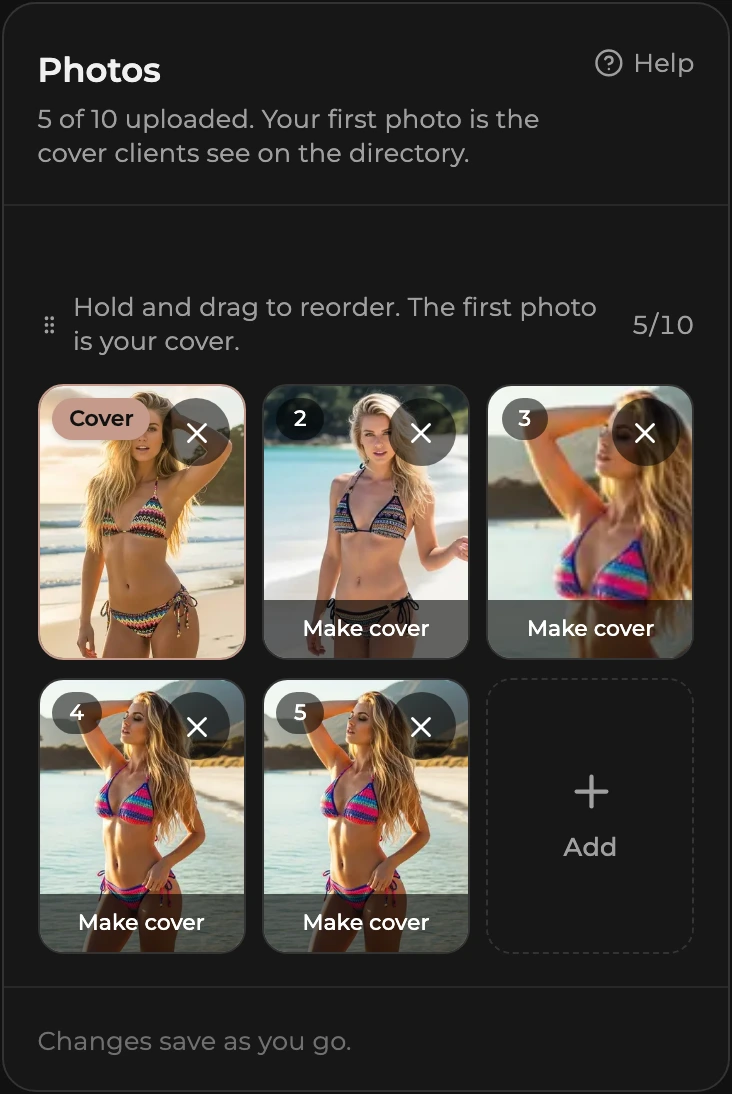
How to upload photos
- Tap the dashed Add tile at the end of the grid. If you have no photos yet, tap the Upload photos box instead.
- Pick one or more files. JPG, PNG, and WebP are accepted, up to 10MB each.
- Each new photo appears in the grid straight away, faded, with a progress bar. Wait for the bars to finish before leaving the page.
Once you have 10 photos the Add tile disappears until you delete one. If a photo fails to upload, the tile says so; tap the tile to clear it and try again.
How to reorder photos
- Press and hold a photo. On a phone, hold for a moment until it lifts. With a mouse, click and start dragging.
- Drag it to the slot you want and let go.
The new order saves as soon as you drop. Each photo shows its position number in the corner, and the first slot shows Cover instead. This is the order clients see on your profile.
How to choose your cover photo
The cover is whichever photo is first, so there are two ways to change it:
- Tap Make cover on any other photo. It moves to slot one and the rest shift along.
- Or drag the photo you want into the first slot.
The first photo you upload to a fresh profile is the cover automatically.
How to delete a photo
- Tap the small × in the corner of the photo.
- Choose Delete to remove it, or Keep it to change your mind.
Deleting the cover makes the next photo your cover. Deleting cannot be undone. If you are not sure which photo it is, tap the photo itself to open it full size and use the arrows to look through the rest.